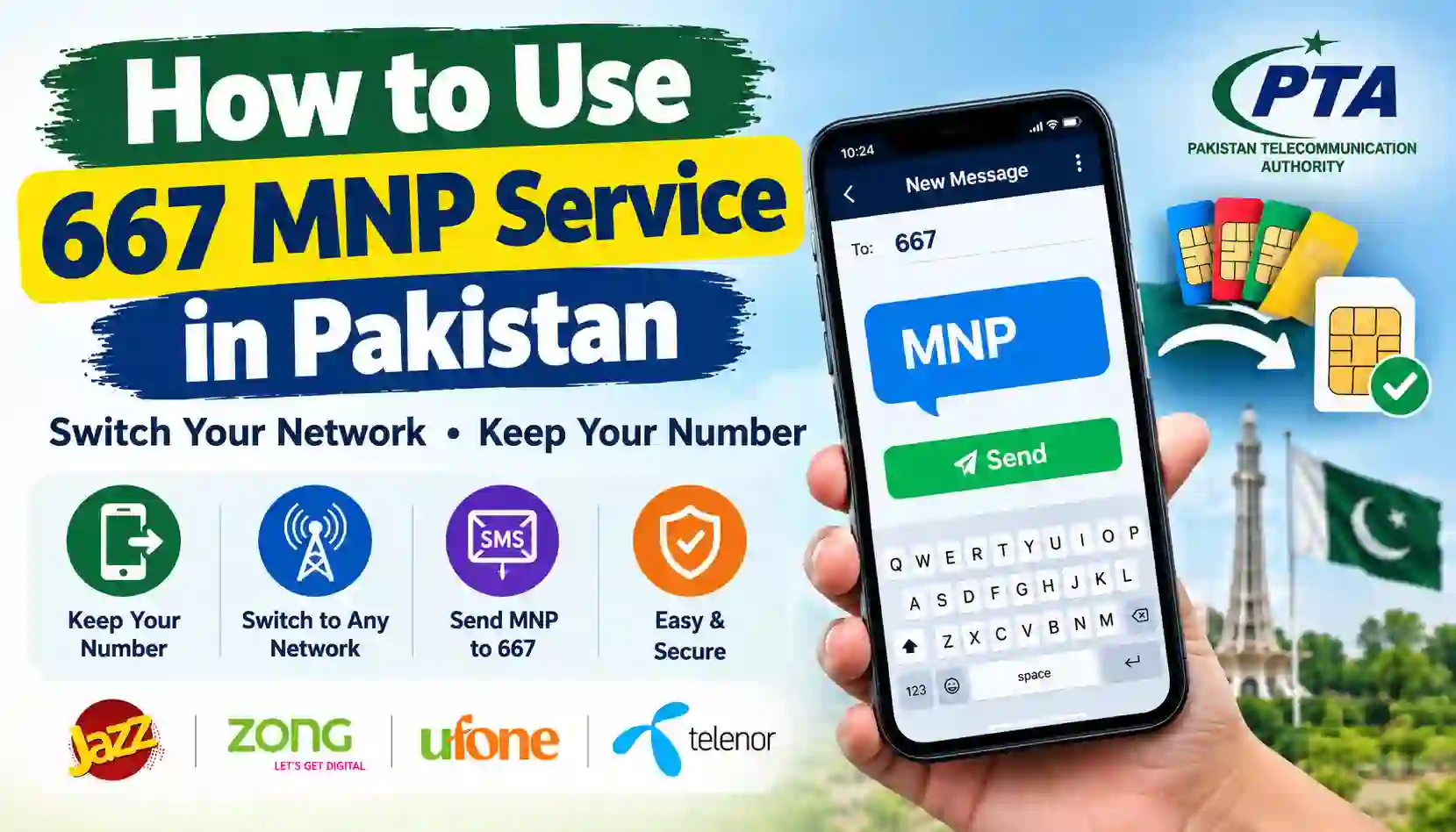
Learn how to use the 667 MNP service in Pakistan. Check your SIM’s registration information, understand mobile number portability, and follow the official steps.
Mobile phones have become an essential part of everyday life in Pakistan. People use their numbers for calls, internet packages, online banking, social media accounts, business communication, and identity verification. Because of this, it is important to understand how your mobile SIM is registered and how to switch mobile networks without losing your existing number.
If you are searching for how to use the 667 MNP service in Pakistan in 2026, this guide explains the process in simple language.
The 667 SMS service is associated with Mobile Number Portability (MNP). MNP allows eligible customers to move their existing mobile number from one network to another while keeping the same number. For example, you may want to move your Jazz number to Zong or transfer a Ufone number to another supported network.
A commonly published first step in the porting process is to type MNP in an SMS and send it to 667 from the SIM you want to transfer. Your current network responds with information used during the portability process. The exact reply format, charges, eligibility requirements, and next steps should be confirmed with the operator you want to join.
It is important to understand that 667 is not a public database for finding the private details of any mobile subscriber. The message must be sent from the SIM involved in the process.
At SimsOwnersDetails.com, we provide educational information about SIM verification, mobile registration, and official telecom procedures in Pakistan. This guide covers the 667 service, its connection with MNP, the difference between 667 and 668, common problems, and ways to protect your personal information.
What Is the 667 MNP Service?
667 is an SMS shortcode associated with Pakistan’s Mobile Number Portability process. Customers may use the service as part of the initial verification steps before moving a mobile number to another network.
MNP stands for Mobile Number Portability. It means you can change your mobile network while retaining your existing mobile number, subject to the applicable requirements.
For example, imagine that you have used the same mobile number on Jazz for several years. You now prefer Zong’s coverage or packages. If your number meets the portability requirements, you may request to move it to Zong without changing the number that your contacts already know.
The 667 service helps initiate the information-checking stage of the process. It is not the same as the full network transfer, and sending the SMS alone does not complete an MNP request.
What can the 667 service help with?
Depending on the current operator process, the service may help you:
- Begin the preliminary SMS step for an MNP request.
- Receive information associated with the SIM sending the message.
- Check the registration information required for portability.
- Proceed with the next instructions provided by your existing or receiving operator.
The service is designed for the SIM involved in the portability process. It should not be treated as a method for obtaining another person’s private subscriber details.
How to Use 667 MNP Service in Pakistan
The basic SMS process is straightforward. Before starting, make sure you have access to the SIM whose number you want to port.
Step 1: Insert the SIM you want to transfer
Insert the relevant SIM into your mobile phone and ensure it can send and receive SMS messages.
If your phone supports two SIM cards, double-check which SIM is selected for sending the message. This helps prevent you from accidentally initiating the process from the wrong number.
Step 2: Open the Messages application
Open your phone’s default SMS or Messages application.
Create a new text message. You do not need to send the message through WhatsApp or another internet messaging service.
Step 3: Type MNP
In the message body, type:
MNP
Keep the message simple. Do not enter your password, banking PIN, or other unrelated personal information.
Step 4: Send the message to 667
Enter 667 as the recipient and send the SMS from the SIM you intend to transfer.
Check the current SMS charges with your operator before sending the message. Charges may apply.
Step 5: Read the reply from your network
Wait for the response from your existing mobile operator.
The reply may contain information associated with the SIM and instructions relevant to the portability process. The exact fields and format can vary, so follow the instructions in the message and those published by your operator.
If the registration information appears incorrect, do not continue blindly. Contact the operator to clarify the discrepancy before proceeding.
Step 6: Follow the receiving network’s instructions
If you want to move to another network, contact the operator you want to join and ask for its current MNP procedure.
The receiving operator will explain the next steps, which may include forwarding an SMS response to a designated shortcode, visiting an authorized outlet, presenting your original CNIC, and completing biometric verification.
Important: Sending MNP to 667 is an initial step, not confirmation that your number has been ported successfully.
Example of Using the 667 Service
Suppose you have a mobile number registered with Jazz and want to move it to another supported network.
Your process may look like this:
| Step | What you do |
|---|---|
| 1 | Use the SIM whose number you want to transfer |
| 2 | Open your SMS application |
| 3 | Type MNP |
| 4 | Send the message to 667 |
| 5 | Review the response from your current operator |
| 6 | Contact the receiving network for the next steps |
| 7 | Complete the required identity and biometric verification |
| 8 | Wait for the operator to confirm the porting outcome |
This is a general explanation. The exact process, destination shortcode, fees, waiting periods, and processing time depend on the current instructions of the receiving operator.
What Information Does the 667 SMS Reply Provide?
The response is associated with the SIM that sent the request and may include subscriber or connection information used for MNP verification.
Depending on the operator’s reply format, this may include information such as the registered subscriber’s name, partially masked identity information, or other details relevant to the portability process.
Do not assume every operator’s reply will contain identical fields.
Why should you check the reply?
Before porting a number, it is sensible to confirm that the registration information corresponds to your own SIM and identity.
If the reply displays unfamiliar or incorrect information, contact the relevant operator before proceeding. The operator can explain the verification requirements and the appropriate process for correcting a registration issue.
Can 667 reveal the full CNIC of any person?
You should not use 667 to try to obtain another person’s private identity information. It is not a public service for searching arbitrary mobile numbers and retrieving complete subscriber records.
If you suspect that a SIM you use is registered incorrectly, resolve the issue through the mobile operator’s authorized verification process.
Difference Between 667 and 668 in Pakistan
Many people confuse the 667 MNP service with the 668 SIM Information System service. Although both are related to SIM registration, they have different purposes.
| Feature | 667 MNP service | 668 SIM check |
|---|---|---|
| Main purpose | Preliminary step associated with mobile number portability | Check SIM registration counts against your CNIC |
| Basic method | Send MNP to 667 from the relevant SIM | Send your own CNIC without dashes to 668 |
| What it helps with | SIM information and steps related to porting a number | Operator-wise SIM counts linked to your CNIC |
| Does it transfer your number by itself? | No | No |
| Is it a public private-data lookup? | No | No |
| Internet required | No for the SMS step | No for the SMS method |
| Possible SMS charges | Check your operator’s current tariff | Charges may apply |
For the official online CNIC-based SIM count check, visit the PTA SIM Information System.
The online portal also provides instructions for checking the network associated with a mobile number by SMS. Always follow the latest instructions displayed on the official portal.
What Is MNP and Why Do People Use It?
Mobile Number Portability allows eligible customers to change their mobile network without changing their existing phone number.
This can be useful when another operator offers better coverage in the areas where you live or work, a more suitable package, or customer support that better meets your needs.
Common reasons for porting a mobile number
1. Better network coverage
A customer may find that another network offers more reliable coverage at home, in the office, or during regular travel.
2. Different call and internet packages
Operators may offer different bundles, prices, and terms. Customers can compare these offers before deciding whether to port.
3. Business continuity
A person who has shared their mobile number with customers may want to retain the same number while switching networks.
4. Personal preference
Some users prefer another operator’s services, support options, or available packages.
5. Managing mobile services
A customer may want to consolidate their mobile services or move to an operator that better matches their usage requirements.
Before deciding, compare current packages, coverage, charges, and eligibility requirements. Do not assume that all services will be identical after a network change.
How to Transfer Your Number to Another Network
The complete MNP process involves more than sending one SMS.
Step 1: Check your eligibility
Contact the network you want to join and ask whether your number is eligible for porting.
Requirements can include account ownership, the status of the number, applicable waiting periods, outstanding dues, and identity verification.
For example, Jazz’s published FAQ describes a 60-day requirement following activation or change of ownership for numbers being ported to Jazz. Requirements should be checked with the receiving operator because the rules and their application may differ by situation.
Step 2: Send the MNP SMS
From the SIM you intend to transfer, type MNP and send it to 667, following the current instructions.
Step 3: Review the response
Read the response carefully. If there is a mismatch in the registration information, ask the current operator how to resolve it.
Step 4: Contact the receiving operator
Visit the receiving operator’s official website or an authorized outlet to obtain the current porting instructions.
Some operators require customers to forward the information received from 667 to a designated shortcode before proceeding. The shortcode is operator-specific, so do not guess it.
Step 5: Complete identity verification
The operator may require your original CNIC and biometric verification at an authorized outlet. The registered ownership information must satisfy the operator’s verification requirements.
Do not provide fingerprints or identity documents to an unauthorized agent.
Step 6: Wait for confirmation
The operator will explain the expected processing time and how you will be notified.
Do not assume that your number has transferred simply because you submitted the SMS or visited a franchise. Wait for confirmation from the receiving operator and follow its instructions for using the new SIM.
Can You Use 667 to Check Any SIM Owner?
No. The 667 MNP service is not intended as a public directory of mobile subscribers.
A common misconception is that you can enter any Pakistani mobile number, send an SMS to 667, and receive the registered owner’s private information. The normal MNP procedure involves sending the message from the SIM concerned.
If you receive a call from an unfamiliar number, do not attempt to access private subscriber records through unofficial websites.
Instead, you can:
- Block unwanted calls or messages.
- Avoid responding to suspicious links.
- Report threats, fraud, or harassment through the appropriate channels.
- Contact your own operator if your account or SIM registration appears compromised.
- Preserve relevant messages and call details if you need to file a complaint.
The distinction matters because protecting your own registration is different from accessing another person’s private information.
What If the 667 SMS Does Not Work?
Sometimes a customer may send MNP to 667 but receive no response or an error message. This does not necessarily mean the service is permanently unavailable.
Try the following troubleshooting steps.
1. Check the selected SIM
If your phone has two SIM cards, confirm that the message was sent from the correct number.
2. Check SMS service
Make sure your SIM is active and can send ordinary text messages. If outgoing SMS is blocked or the account has a service restriction, contact the operator.
3. Confirm the shortcode and message
Check that the message contains MNP and the recipient is 667. Follow any updated instructions from your operator.
4. Check your account balance and SMS charges
If the SMS service is chargeable, ensure your account can cover the applicable fee.
5. Restart your phone
A restart may resolve a temporary network or messaging issue. You can also check whether the SIM is receiving other messages normally.
6. Contact customer support
If the problem continues, contact your current operator. Explain when you sent the message and whether you received an error or no response.
Avoid repeatedly sending messages if you are unsure whether charges apply.
What If the SIM Is Not Registered in Your Name?
If you want to port a SIM but discover that the registration details do not match your identity, you may need to resolve the ownership issue first.
Contact the operator that currently provides the SIM and explain the situation. Ask which documents and verification steps are required to correct or transfer ownership.
Do not assume that a successful SMS response means the SIM is legally registered in your name or that you can automatically transfer ownership through MNP.
MNP and ownership transfer are different processes:
- MNP changes the mobile network while retaining the number.
- Ownership transfer changes the registered holder of the number, subject to the operator’s rules.
The operator will advise which process applies to your circumstances.
How to Check SIMs Registered on Your CNIC
If your goal is to see how many SIMs are registered against your own CNIC, use PTA’s official SIM Information System rather than the MNP shortcode.
Online method
- Visit https://cnic.sims.pk/.
- Select the relevant identity-document option.
- Enter your own CNIC as instructed.
- Submit the form and review the result.
- Contact the relevant operator if the count appears unexpected.
SMS method
- Open the Messages application.
- Enter your own 13-digit CNIC without dashes.
- Send it to 668.
- Review the response.
SMS charges may apply. Follow the current instructions published by PTA.
These methods are intended to help you check your own registration counts. They do not provide a public search for another subscriber’s private details.
How to Stay Safe When Using SIM Verification Services
SIM registration and mobile numbers are closely connected to personal identity and online accounts. It is important to use official services and protect your information.
Follow these security practices
- Use official telecom operator websites and authorized outlets.
- Do not share one-time passwords or banking verification codes.
- Avoid websites claiming to reveal complete private SIM records.
- Do not upload your CNIC to unfamiliar databases.
- Keep your phone and messaging applications updated.
- Report suspected unauthorized registrations to the relevant operator.
- Read the terms and charges before using an SMS service.
- Never provide fingerprints to an unverified person claiming to perform a SIM check.
For more awareness material, visit PTA’s National Telecom and IT Security Board.
Official Resources for MNP and SIM Verification
Use the following resources to find current information and resolve problems.
| Resource | Purpose | Link |
|---|---|---|
| Jazz | MNP instructions and customer support | jazz.com.pk |
| Zong | MNP instructions and customer support | zong.com.pk |
| Ufone | MNP instructions and customer support | ufone.com |
| Telenor Pakistan | MNP instructions and customer support | telenor.com.pk |
| PTA | Telecom rules and public information | pta.gov.pk |
| PTA SIM Information System | Check SIM counts associated with your CNIC | cnic.sims.pk |
| PTA Complaint Management System | Submit eligible telecom complaints | complaint.pta.gov.pk |
| PTA NTCERT | Cybersecurity awareness and safety guidance | ntcert.pta.gov.pk |
Operator procedures, charges, and porting requirements can change. Confirm the latest instructions before starting a request.
Frequently Asked Questions (FAQs)
1. What is the 667 MNP service in Pakistan?
The 667 SMS service is associated with the preliminary steps of Mobile Number Portability. It helps customers obtain information from the SIM involved in the process before following the receiving operator’s porting instructions.
2. How do I use 667?
Open your SMS application, type MNP, and send it to 667 from the SIM you want to port. Read the response and follow the current instructions provided by your operator.
3. Is the 667 MNP service free?
Charges may apply. Check the current SMS tariff with your operator before sending the message.
4. Can I check another person’s SIM owner details through 667?
The service is not intended as a public lookup tool for arbitrary mobile numbers. Use it only for the SIM involved in the legitimate MNP or registration process.
5. Does sending MNP to 667 change my network?
No. Sending the SMS is an initial step and does not complete the transfer. You must follow the receiving operator’s process and satisfy its requirements.
6. What is the difference between 667 and 668?
667 is associated with the MNP process. The 668 service is used to check SIM registration counts against your own CNIC.
7. Can I transfer my Jazz number to Zong without changing the number?
Mobile Number Portability is designed to let eligible customers switch networks while retaining their number. Contact Zong for its current eligibility requirements, charges, and process.
8. Can I transfer my number if it is registered under another person’s CNIC?
You may need to resolve the ownership issue before porting. Contact your current operator and follow its authorized ownership verification or transfer procedure.
9. Why am I not receiving a reply from 667?
Possible reasons include a wrong SIM selection, a temporary network issue, SMS restrictions, insufficient balance, or a service-related problem. Check the basics and contact your operator if the problem persists.
10. Is 667 the same as the PTA SIM Information System?
No. The 667 SMS is associated with MNP, while the PTA SIM Information System lets you check SIM counts registered against your CNIC.
11. How long does MNP take?
The processing time depends on the receiving operator’s current procedure and the verification of your request. Ask the receiving operator for its latest estimate and wait for confirmation.
12. What should I do if my MNP request is rejected?
Ask the receiving operator for the reason. The issue may involve eligibility, registration information, identity verification, account status, or another applicable requirement. Resolve the specific issue before submitting another request.
Conclusion
The 667 MNP service is useful for customers who want to begin the process of moving their mobile number to another network in Pakistan.
The basic SMS step is to type MNP and send it to 667 from the SIM you want to transfer. After receiving the response, follow the instructions provided by your current and receiving operators, including any required identity verification.
Remember that 667 and 668 have different purposes. Use 667 for the relevant MNP process and PTA’s SIM Information System to check the number of SIMs registered against your own CNIC.
Always use official telecom channels, confirm current charges and eligibility requirements, and avoid websites that promise unauthorized access to private subscriber records.
Disclaimer: Sim Owners Details is an independent informational website and is not affiliated with PTA, NADRA, or any mobile network operator. This article is for educational purposes. Confirm current procedures and requirements with the relevant official service provider.